
Welcome to Palengke UK!
Your shop has its own back-end providing you your full and exclusive control of your shop.
To get into the back-end, you must login to your seller’s account. Either click on the Sign in/Join link at the top left corner of the page or the ‘My Account’ link located at the footer.
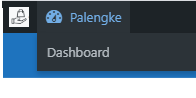
To get into your dashboard, hover the Palengke link at the top left corner of the page then click ‘Dashboard’.
The Seller’s Dashboard
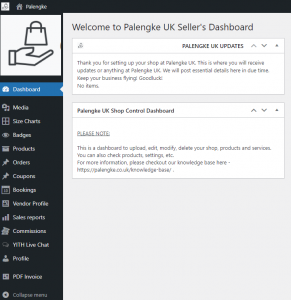
DASHBOARD EXPLAINED. Your dashboard contains tabs in vertical navigation style to control your shop. Some tabs also have child tabs for further options.
- Media – This is the location of all your media files – images, videos, files, etc. You can upload media files straight away or if you’ve uploaded media files in any sections of your website, they will automatically saved here and they can also be accessed or edited here.
- Size Charts – This is where you can create or edit your size charts that’ll be used in your products.
- Badges – This is where you can create or edit your badge that’ll be used in your products. There are lots of ready-for-use or ready-to-edit badge templates that can be found here.
- Products – This is where your products are. Here you can add/edit products, auctions or bookings.
- Orders – This is where your sales are. You can process all transactions related to sales here. You can resend invoice, enter tracking numbers, and so on.
- Coupons – This is where you can create your own exclusive coupons or discount codes.
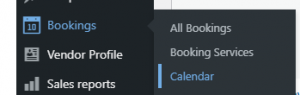
- Bookings – If you have booking products like holiday cottages, caravan hire, B&B or services, this is where you can find all bookings made as well as creating booking services.
- Vendor Profile – This is where you can edit or personalize your shop. At the ‘Frontpage’, you can put description to your shop, change the header image, avatar, contact information and so on. You can also find your payment information here. If you’re on holiday/vacation, you can also set your shop’s holiday option here with your holiday message. You can also enable and set your own shipping here. More on shipping here.
- Sales Report – This is where you can find your shop’s sales history and can be exported in CSV file.
- Commissions – This is where you can find the amount paid to your account by Palengke UK. When a buyer bought your product, Palengke UK will process the transaction and payment will go to your account in a form of commission.
- Yith Live Chat – This is where your exclusive live chat console is. This also logs your conversation as well as offline messages.
- Profile – This is where you can change your name, password, email, theme colour of your back-end, avatar of your Live Chat, etc.
- PDF Invoice – This is where you can configure and personalize your PDF invoice. You can set the invoice number, prefix, suffix, etc. and the PDF templates.
